Scala入门

Scala简介

官方教程: Twitter: https://twitter.github.io/scala_school/zh_cn/

本地环境配置

Scala官网下载

  • 安装JDK8,或者OpenJDK

  • 安装 Scala

  • 安装 SBT

    • sbt数据源问题

      • 将sbt-launch.jar中sbt.boot.properties文件下的在[repositories]里面的local下面添加以下数据源
      1
      2
      3
      alirepo1:https://maven.aliyun.com/repository/central
      alirepo2:https://maven.aliyun.com/repository/jcenter
      alirepo3:https://maven.aliyun.com/repository/public
      • 或者\sbt\conf目录下,新建文件repository.properties添加
      1
      2
      3
      4
      5
      [repositories]
      local
      alirepo1:https://maven.aliyun.com/repository/central
      alirepo2:https://maven.aliyun.com/repository/jcenter
      alirepo3:https://maven.aliyun.com/repository/public
      1
      2
      在conf/sbtconfig.txt中添加repository.properties文件路径
      -Dsbt.repository.config=D:/ProgramFile/sbt/conf/repository.properties

IDEA配置

下载地址:https://www.jetbrains.com/idea/download/#section=windows 注册码

配置

Configure -> Project default -> Project setting -> GlobalLibraries -> add -> Brower Scala Sdk path

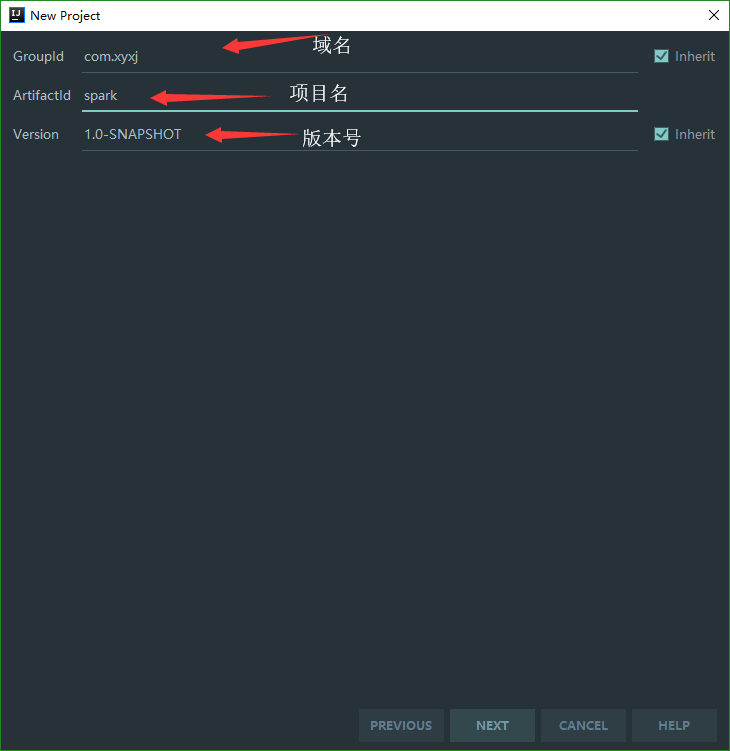
创建Maven项目
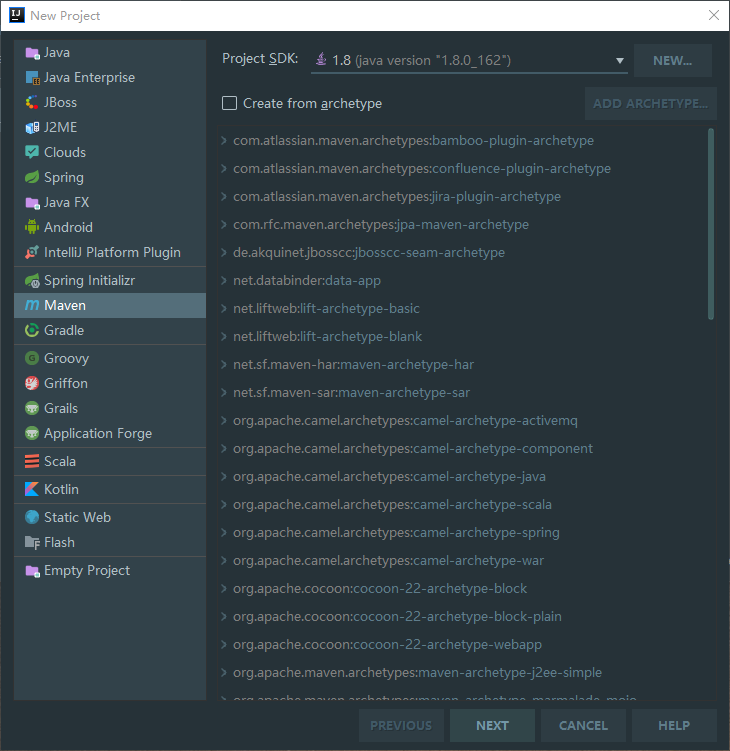
Maven项目搜索: https://mvnrepository.com/artifact/org.apache.spark/spark-core_2.12/2.4.0

在pom.xml中添加, 然后等待下载完成.顺便将SQL,Streaming,ML依赖进去..

1
2
3
4
5
6
7
8
9
10
11
12
13
14
15
16
17
18
19
20
21
22
23
24
25
26
27
28
29
30
31
32
33
34
<dependencies>
<dependency>
<groupId>org.apache.spark</groupId>
<artifactId>spark-core_2.12</artifactId>
<version>2.4.0</version>
</dependency>
</dependencies>
<!-- https://mvnrepository.com/artifact/org.apache.spark/spark-sql -->
<dependency>
<groupId>org.apache.spark</groupId>
<artifactId>spark-sql_2.12</artifactId>
<version>2.4.0</version>
</dependency>
<!-- https://mvnrepository.com/artifact/org.apache.spark/spark-streaming -->
<dependency>
<groupId>org.apache.spark</groupId>
<artifactId>spark-streaming_2.12</artifactId>
<version>2.4.0</version>
<scope>provided</scope>
</dependency>
<!-- https://mvnrepository.com/artifact/org.apache.spark/spark-mllib -->
<dependency>
<groupId>org.apache.spark</groupId>
<artifactId>spark-mllib_2.12</artifactId>
<version>2.4.0</version>
<scope>runtime</scope>
</dependency>
<!-- https://mvnrepository.com/artifact/org.apache.spark/spark-hive -->
<dependency>
<groupId>org.apache.spark</groupId>
<artifactId>spark-hive_2.12</artifactId>
<version>2.4.0</version>
<scope>provided</scope>
</dependency>

在下载库里面看到spark2.4.0依赖了hadoop2.6.5, 至此Maven项目配置完成.

开始设置scala framework

选择Add Framework Support
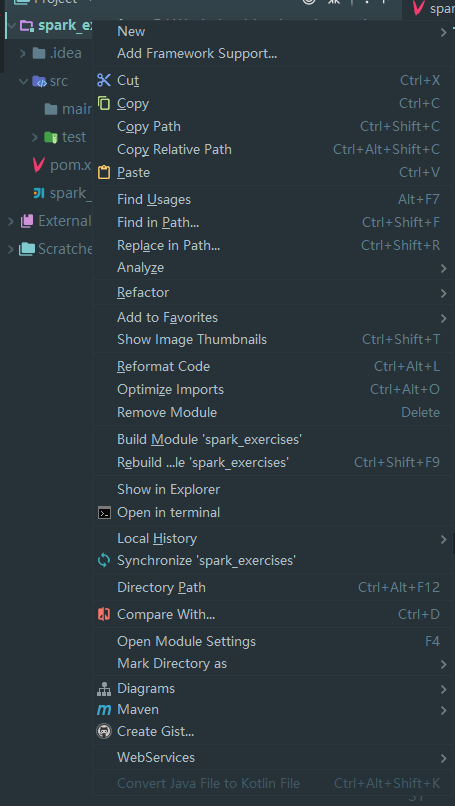
选择之前配置的scala sdk,并选择完成.

然后删除main下的所有文件夹,并新建一个scala文件夹, 右键scala文件夹.选择sources Root
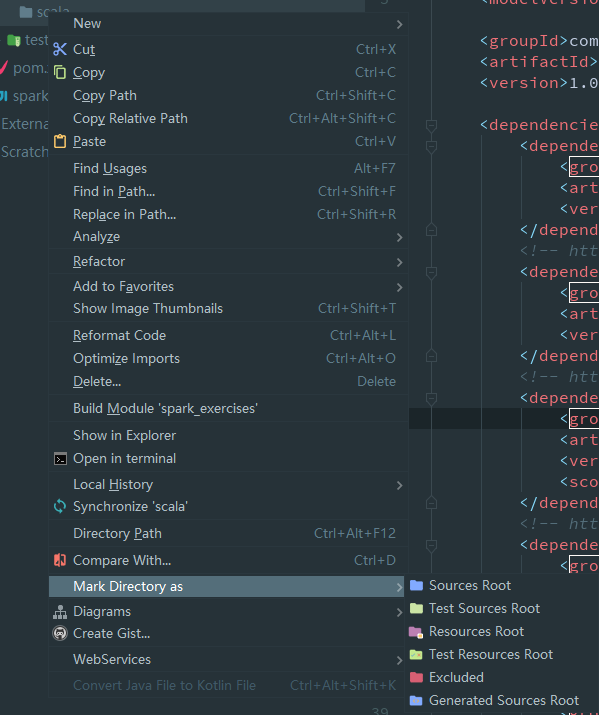
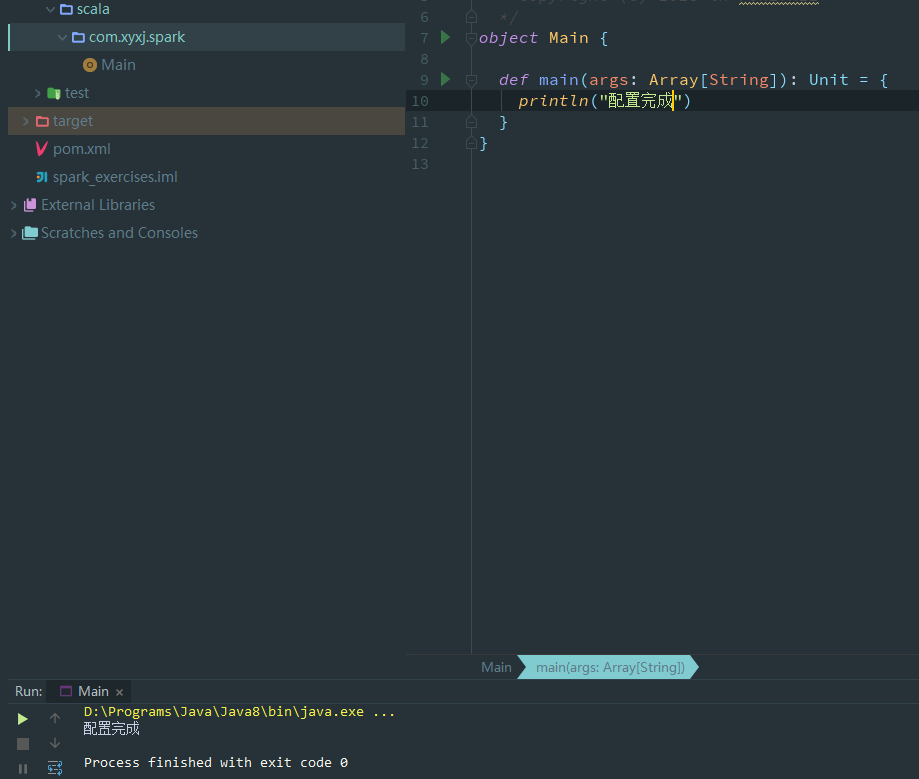
创建包名和Main.scala,运行main函数
基础

语法, 变量var, 常量val

1
2
3
4
5
6
7
8
9
10
11
12
13
14
15
16
17
18
19
20
21
22
$ sbt console
[warn] No sbt.version set in project/build.properties, basedirectory: D:\Workplace\Java\scala_console
[info] Set current project to scala_console (in build file:/D:/Workplace/Java/scala_console/)
[info] Updating ...
[info] Done updating.
[info] Non-compiled module 'compiler-bridge_2.12' for Scala2.12.7. Compiling...
[info] Compilation completed in 14.939s.
[info] Starting scala interpreter...
Welcome to Scala 2.12.7 (Java HotSpot(TM) 64-Bit Server VM,Java 1.8.0_181).
Type in expressions for evaluation. Or try :help.

scala> 1+1
res0: Int = 2

scala> val n = 1+1
n: Int = 2

scala> var name = "xyxj"
name: String = xyxj

scala> name = "ixyxj"
name: String = ixyxj

函数, 匿名函数

1
2
scala> def addOne(m: Int): Int = m + 1
addOne: (m: Int)Int

Basic

1
2
3
4
5
6
7
8
9
10
11
12
13
14
15
16
17
18
19
20
21
22
23
24
25
26
27
28
29
30
31
32
33
34
35
36
37
38
39
40
41
42
43
44
45
46
47
48
49
50
51
52
53
54
55
56
57
58
59
60
61
62
63
64
65
66
67
68
class Basic {
//变量
var name = "xyxj"
//常量
val con = "ixyxj"

// 函数
def add(x: Int, y: Int): Int = x + y

//匿名函数
(x: Int, y: Int) => x + y

// 柯里化函数
def multiply(m: Int)(n: Int): Int = m * n

// 可变长度参数
def addAll(args: String*): Unit = {
args.foreach(arg =>
arg.capitalize
)
}

// 构造函数
class Calculator(brand: String) {
//val brand: String = "HP"

def add(x: Int, y: Int): Int = x + y
}

// 继承
class ScientificCalculator(brand: String) extends Calculator(brand = brand) {

}

// 抽象类
abstract class Shape {
def getArea: Int
}

// 特质(traits)
trait Car {
val brand: String
}

trait Shiny {
val shineRefraction: Int
}

class BWM extends Car {
override val brand: String = "BWM"
}

// 拓展多个特质
class BWM2 extends Car with Shiny {
override val brand: String = "BWM"
override val shineRefraction: Int = 12
}

// 类型
trait Cache[K, V] {
def get(key: K): V
def put(key: K, value: V)
def putAll(values: V*)
def delete(key: K)
def deleteAll()
}

}

特质: 是一些字段和行为的集合,可以扩展或混入(mixin)你的类中。特质VS抽象:

  • 优先使用特质。一个类扩展多个特质是很方便的,但却只能扩展一个抽象类。
  • 如果你需要构造函数参数,使用抽象类。因为抽象类可以定义带参数的构造函数,而特质不行。例如,你不能说trait t(i: Int) {},参数i是非法的。

函数与类型

1
2
3
4
5
6
7
8
9
10
11
12
13
14
15
16
17
18
19
20
21
22
23
24
25
26
27
28
// apply 方法 语法糖
class Food {

}

class FoodMaker {
def apply: Food = new Food()
}

class Bar {
def apply: Int = 0
}

// 单例
object Timer {
var count = 0

def currentCount(): Long = {
count += 1
count
}

// 函数式编程
object addOne extends (Int => Int) {
def apply(m: Int): Int = m + 1
}

}

1
package com.xyxj.example

匹配 match

  • 匹配值
1
2
3
4
5
6
val times = 1  
val str = times match {
case 1 => "one"
case 2 => "two"
case _ => "other"
}
  • 匹配类型
  • 匹配成员

样本类

1
case class Calculator(brand: String, model: String)

异常

1
2
3
4
5
6
7
8
9
val result = try {

} catch {
case e: Exception => {
e.printStackTrace()
}
} finally {
print("final")
}

try … catch 也是面向对象的。

集合

基本数据结构

1
2
3
4
5
6
7
8
9
10
11
12
13
14
15
16
17
// 数组
val numbers = Array(1, 2, 3, 4, 5, 6)

// 列表
val lists = List(1, 2, 3, 4, 5, 6)

// 集合Set, 集合无序不重复的集合
val sets = Set(1, 2, 1, 2, 1, 3, 4, 5, 6)

// 元组 Tuple
val hostPort = ("localhost", 80)

//执行结果:
[I@26ba2a48
List(1, 2, 3, 4, 5, 6)
Set(5, 1, 6, 2, 3, 4)
(localhost,80)

注意: 创建元组 -> , eg: 1->2 创建一个(1,2)的元组

映射Map

1
2
3
4
5
6
7
8
9
val map = Map(1 -> 2, 2 -> 2)
println(map.apply(2))
try {
println(map.apply(12))
} catch {
case e: NoSuchElementException => {
e.printStackTrace()
}
}

函数组合 compose

1
2
3
4
5
6
7
8
9
10
def main(args: Array[String]): Unit = {
println(compose("123"))
}

def f(s: String) = "f(" + s + ")"
def g(s: String) = "g(" + s + ")"
val compose = f _ compose g

// 输出
f(g(123))

调用顺序 andThen 同上

类型和多态

Donate comment here